
Today, we spend our lives on the web. We click on links without thinking twice, open suspicious attachments, visit unfamiliar sites. Yet each time, we expose our computer, files, passwords, and entire digital life more or less directly.
What if the simplest solution was also the most radical: never let the web truly touch our machine?
The Sandbox: An Old Idea That Remains Highly Relevant
The principle has existed for a long time. Modern browsers already isolate each tab in its own process with very limited rights. This is called native sandboxing.
Here’s a classic diagram of Chrome’s (Chromium) multi-process architecture, clearly showing the browser process (non-sandboxed) managing the interface and the renderer processes (sandboxed) executing web content:
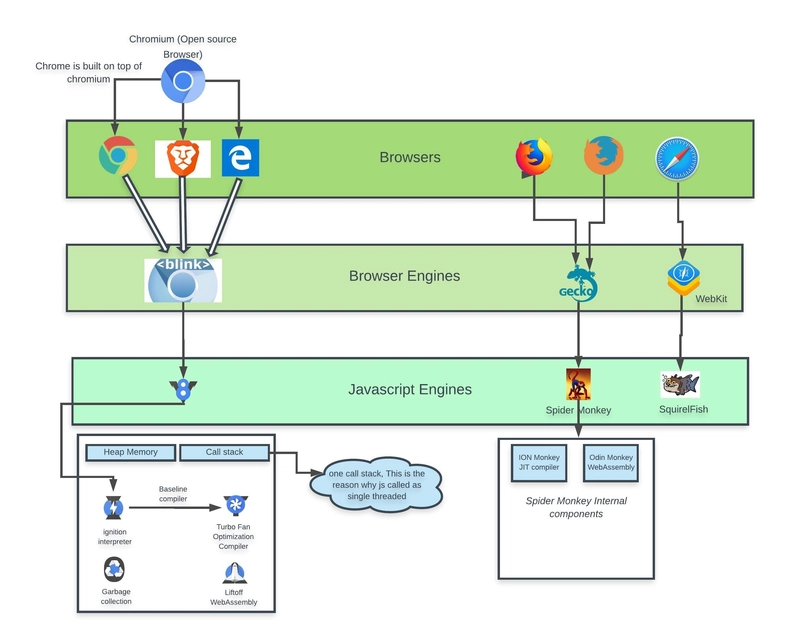 Chromium multi-process architecture: renderer process isolation
But when we look closely, we realize it’s not always enough:
- a well-targeted zero-day vulnerability can sometimes escape the sandbox
- some malware patiently waits for the user to perform an action granting more privileges
- browser-side attacks are becoming increasingly sophisticated (WebGPU, WebAssembly, etc.)
So more and more people are asking: what if we went further? What if we ran the entire browser elsewhere?
Remote Browsing, or “I Look, But Don’t Touch”
The idea is simple on paper: the real browser runs on a remote server (in the cloud, in a container, in a virtual machine…), and on your screen you only receive an animated image in real time.
You click → the event is sent to the server The server moves the page → it sends you the new image
Technically, it’s bidirectional video streaming with very low latency. WebRTC has become the star for this: it’s the same technology that powers Google Meet, Discord, or cloud gaming.
Here’s a simplified diagram explaining remote browser isolation flow:
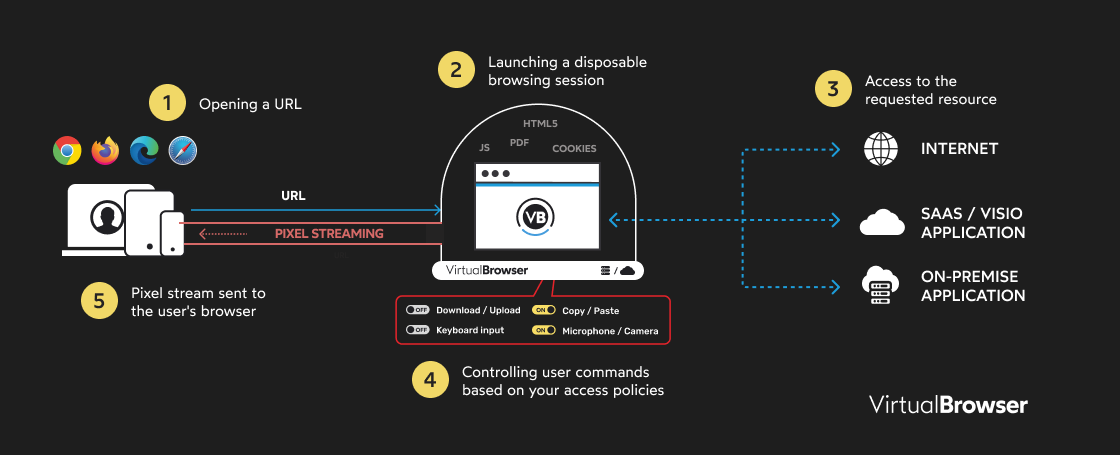 Data flow in a remote isolated browsing architecture
Real-World Examples Emerging
Use cases are numerous and varied:
- Enterprises: giving employees a “phantom browser” for sensitive tasks (online banking, professional messaging, administrative sites)
- Security teams: opening suspicious attachments or URLs in a disposable browser
- Families: letting children browse without risking breaking everything
- Researchers: testing malware without contaminating their lab
Existing Commercial Solutions
There are already existing solutions on the market today:
Menlo Security
One of the pioneers in cloud-native remote browser isolation, with invisible and high-performance isolation.
→ https://www.menlosecurity.com/
Ericom Shield
Zero-trust isolation for web and email, rendered in cloud containers.
→ https://www.ericom.com/remote-browser-isolation
Zscaler Browser Isolation
Transforms web content into a secure pixel stream, integrated into their Zero Trust platform.
→ https://www.zscaler.com/products-and-solutions/browser-isolation
Cloudflare Browser Isolation
Cloud isolation with multiple modes (pixel pushing, DOM reconstruction, etc.).
→ https://www.cloudflare.com/learning/access-management/what-is-browser-isolation
Open-Source Solutions
Neko (n.eko)
There’s also Neko, a super interesting and self-hosted open-source project:
- virtual browser running in a Docker container
- uses WebRTC to stream display in real time (video + audio + interactions)
- each session is isolated: perfect for disposable browsing, without local traces
- supports multiple browsers (Firefox, Chrome, Brave, Tor, etc.)
- ideal for collaborative watch parties, secure testing, or anonymous browsing from any device
→ GitHub Repo: https://github.com/m1k1o/neko → Official docs: https://neko.m1k1o.net/
It’s often compared to a modern clone of Rabb.it, but with a focus on security and isolation. Many use it self-hosted on a VPS or NAS to have their own private “phantom browser.”
BrowserMania (Academic Project)
Then there are more experimental projects, like BrowserMania (a recent student/academic project) that pushes the idea quite far:
- each session runs in its own Docker container
- Kubernetes orchestrates everything: creation, destruction, automatic scaling
- WebRTC sends the image and retrieves clicks/mouse/keyboard
- at the end of the session → the container is deleted, zero traces
Detailed Technical Architecture
Here’s an overview of the technical architecture of a cloud-native isolation solution:
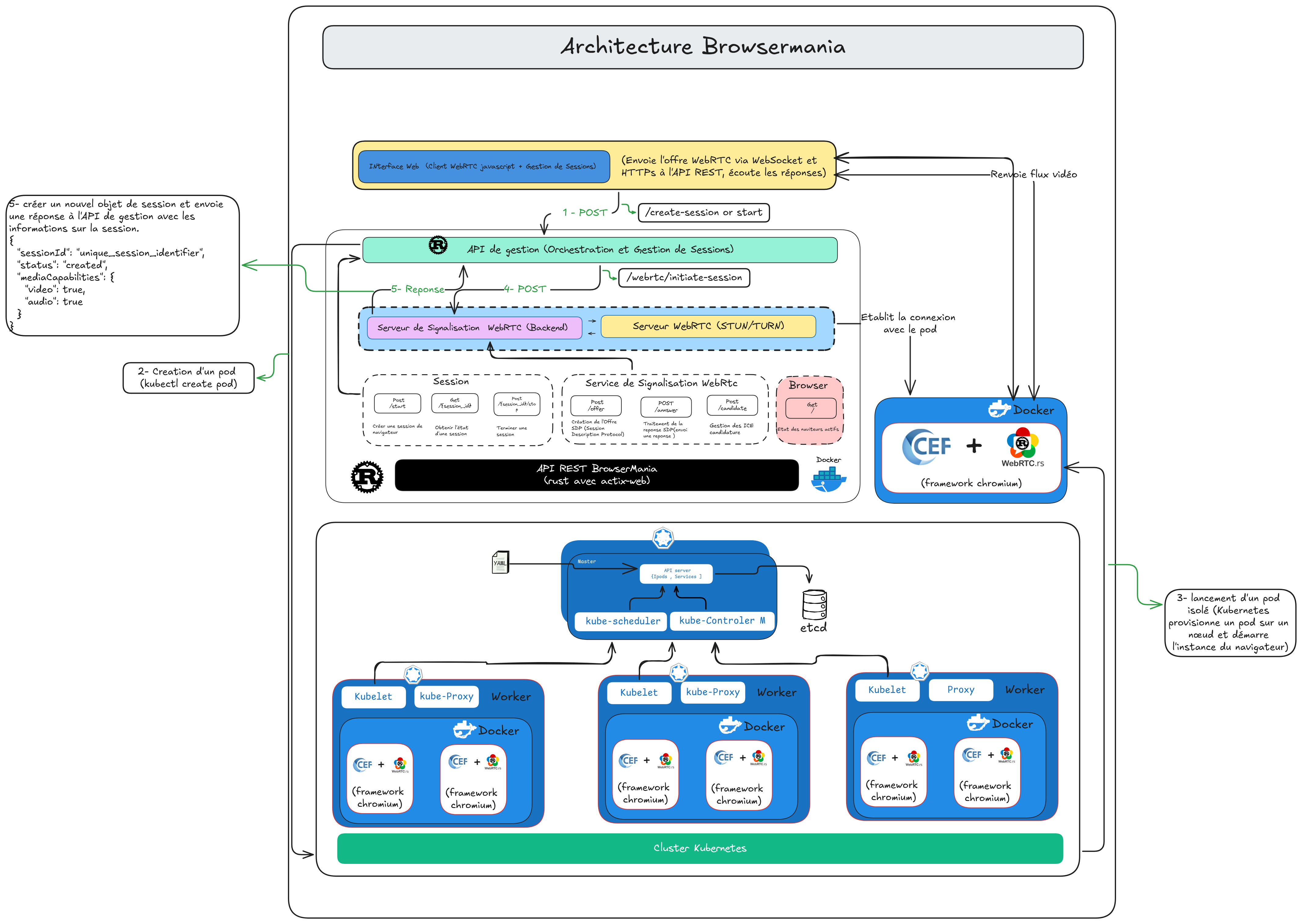 Cloud-native architecture with Kubernetes orchestration
It’s heavy, consumes server resources, but for critical use cases, it’s very effective.
Drawbacks We Can’t Ignore
Like any technology, there are trade-offs:
1. Latency
Even with a good connection, you sometimes feel the delay (especially when typing fast or scrolling quickly). Video game streaming has the same problem.
2. Dependency
If the server goes down, you can’t browse. No internet connection = no browsing, even locally.
3. Privacy
Your actions go through an intermediary. Even if everything is end-to-end encrypted (WebRTC uses DTLS-SRTP), complete trust in the platform operator remains necessary.
So, Is This the Future of Browsing?
Not for everyone, not every day. But for certain specific situations, yes, it’s starting to look like a real pragmatic answer.
We may be transitioning from an era where “the browser protects my computer” to an era where “my computer never really touches the internet.”
When to Use Isolated Browsing?
Recommended for:
- Opening suspicious links or dubious attachments
- Browsing on unsecured public networks
- Accessing sensitive sites (banking, admin, healthcare)
- Testing and development environments
- Professional contexts with critical data
Less suitable for:
- Light daily use (reading articles, YouTube)
- Areas with limited internet connection
- Web applications requiring maximum performance
- Cases where privacy from the provider is critical
Try It Yourself
Want to test it? Here are some options:
Option 1: Local Docker (easiest)
If you just want to try quickly with our Chromium Docker image:
docker run -d \
  --name=chromium_test \
  --security-opt seccomp=unconfined \
  -e PUID=1000 \
  -e PGID=1000 \
  -e TZ=Etc/UTC \
  -p 3000:3000 \
  -p 3001:3001 \
  --shm-size="1gb" \
  --restart unless-stopped \
  dilanek/docker_chromiun:test
Then open your browser at http://localhost:3000
Option 2: Neko (complete self-hosted)
For a complete self-hosted solution:
git clone https://github.com/m1k1o/neko
cd neko
docker-compose up -d
Option 3: Full Kubernetes Architecture
For a complete cloud-native deployment, check out the BrowserMania project:
→ https://github.com/BrowserMania/Browsermania
Conclusion
Isolated web browsing is not a passing fad. It’s a concrete technical response to real and growing threats.
The technologies are mature (WebRTC, containers, orchestration), performance is constantly improving, and use cases are multiplying.
The real question is no longer “does it work?” but rather “for which use cases is it worth it?”
Would you be ready to browse like this today? To keep the web… outside?